
Turn long gaming recordings into reviewed, ready-to-post clips.
RaidCut watches your recording folder, sends new gameplay to OpusClip for generation, reviews candidates on your desktop, and helps you approve, schedule, and learn from what you publish—using your own OpusClip account.
Works with your own OpusClip account. Your source recordings stay local.
Built for creators who already record more content than they can publish.
Your footage is not the bottleneck. Your workflow is.
Most gaming creators already have enough footage. The problem starts after the clips are generated: too many candidates, unclear titles, manual review, lost ideas, scattered notes, and no repeatable publishing rhythm.
Hours of gameplay vanish
You record the moments, but most sessions never become content.
Clips are generated, then abandoned
Even good clips die when review, titles, hooks, and scheduling are manual.
No repeatable system
Growth requires rhythm. RaidCut gives you the pipeline.
RaidCut turns clip chaos into a repeatable review workflow.
- ✕Raw recordings in random folders
- ✕Manual uploads
- ✕No review queue
- ✕Titles written from scratch
- ✕Posting when you remember
- ✕No learning loop
- ✓Folder watch for new recordings
- ✓Upload to your OpusClip account
- ✓Ranked review queue in RaidCut
- ✓Approve, reject, or rework with AI context
- ✓Schedule approved clips via OpusClip
- ✓Learn from published clip performance
OpusClip creates the clips. RaidCut runs the workflow.
Six steps from a new recording on disk to clips you have reviewed and scheduled—with your own OpusClip account doing the generation and publishing API work.
Watch a folder
Point RaidCut at your local recording folder so new gameplay files are detected automatically.
Upload to OpusClip
Send each source video to your own OpusClip account for clip generation.
Review in RaidCut
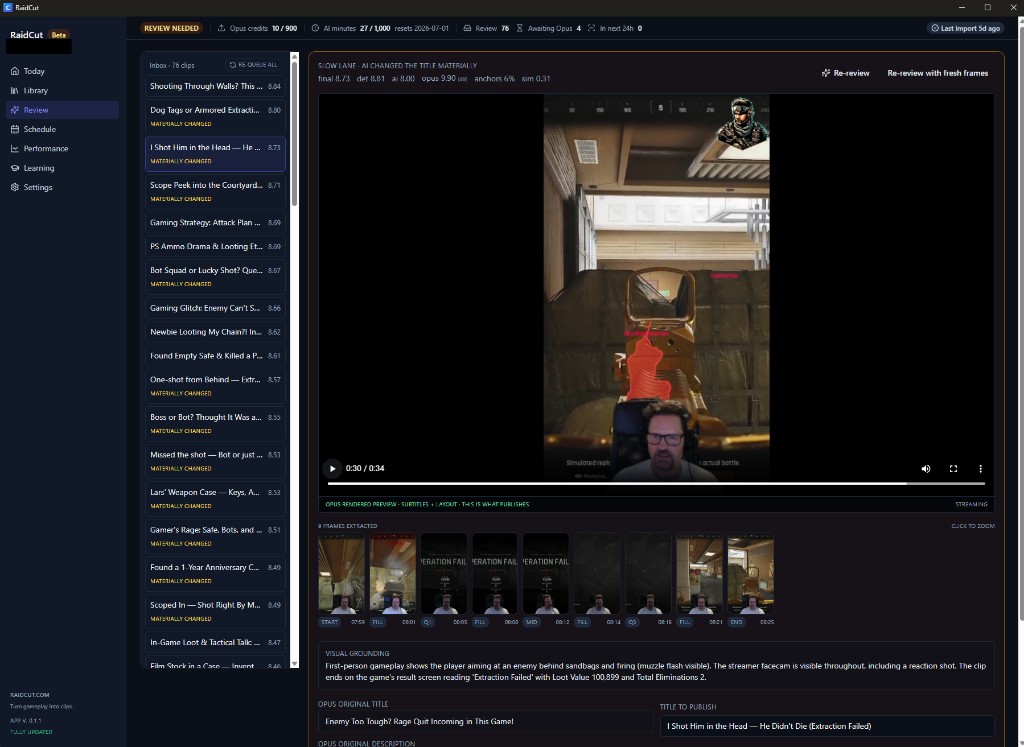
Generated clips return to a ranked review queue with preview, frames, and AI context.
Approve, reject, or rework
Decide what is worth publishing using scores, title comparison, and visual grounding.
Schedule approved clips
Move keepers into your publishing flow and schedule via OpusClip for Shorts, TikTok, Reels, and more.
Learn from performance
Track what you published so future selection, titles, and scheduling get sharper over time.
From local recordings to scheduled gaming clips.
RaidCut watches your local recording folder, sends new source videos to OpusClip for processing, brings the generated clips back into a focused review workflow, and helps you approve, reject, schedule, and learn from every published clip.
From reviewed clip to publish-ready short.
RaidCut is not trying to prove that every clip goes viral. It helps you make better publishing decisions faster: review the candidate, understand the moment, generate stronger packaging, and move the keeper into your schedule.
Built for the way gaming creators actually work.
Local folder watch
Detect new gameplay recordings from a folder you choose—files stay on your machine.
OpusClip upload orchestration
Send source videos to your own OpusClip account for clip generation.
Ranked review queue
Generated clips return to one inbox for preview, context, and triage.
Faster approve / reject
Visual grounding, extracted frames, AI reasoning, and title comparison in the review screen.
Titles, hooks, and descriptions
AI-assisted copy for the clips you decide to keep—not a replacement for your judgment.
Platform-specific packaging
Angle each keeper for YouTube Shorts, TikTok, and Reels.
Schedule via OpusClip
Plan approved clips for TikTok, YouTube Shorts, Reels, and other short-form channels through OpusClip.
Usage and quota tracking
See AI processing minutes and stay in control of spend.
Performance learning loop
Track published clip outcomes to improve future selection and packaging decisions.
Built for long-form gaming sessions
Designed for multi-hour raids, matches, and streams.
Made for creators with too much footage and not enough time.
Streamers
Turn stream archives into a steady short-form pipeline.
YouTubers
Extract Shorts from long recordings and keep your channel active between uploads.
TikTok gaming creators
Package clips faster with hooks, captions ideas, and platform-ready angles.
MMO, FPS, extraction and PvP creators
Raids, wipes, clutches, fails, boss fights, drama, loot, reactions - turn the moments into output.
OpusClip creates the clips. RaidCut runs the workflow.
RaidCut adds a workflow layer on top of OpusClip. Connect your own OpusClip account to process recordings, review and score clip candidates, and prepare approved clips for scheduling and publishing through OpusClip. You stay in control of what ships.
RaidCut is an independent workflow tool and is not an official OpusClip partner unless stated otherwise.
Start free. Upgrade when your content pipeline grows.
RaidCut is free to start. Paid plans add more AI processing minutes for review, titles, hooks, descriptions, and workflow automation.
Free
Start building your pipeline
- 50 AI processing minutes / month
- Local desktop workflow
- Connect your own OpusClip account
- Clip inbox
- Schedule planning
Pro
Best for getting consistent
$86/year with annual billing
- 300 AI processing minutes / month
- AI clip review
- AI titles, hooks, descriptions
- Usage dashboard
- Better workflow automation
Creator
Best for serious creators
$182/year with annual billing
- 1,000 AI processing minutes / month
- Higher AI workflow volume
- More review / copy capacity
- Better for frequent posting
- Priority feature access later
What are AI processing minutes?
1 AI processing minute equals 1 minute of source video processed through RaidCut's AI workflow.
Example: Run AI review on a 20-minute recording and it uses 20 AI processing minutes.
OpusClip usage is separate and handled through your own OpusClip account.
Questions, answered.
Your next session is already content.
Stop letting gameplay disappear into folders. Build your clip pipeline with RaidCut.